
Presented by the Government of Brunei Darussalam
Identifying Government Websites
Official website links end with .gov.bn
Sites with .gov.bn are official government websites of Brunei Darussalam. See trusted websites.
Secure websites use HTTPS
Look for a lock ( ) or https:// as an added precaution. Share sensitive information only on official, secure websites.


Form Copy / Move Process
The Form Copy / Move process can be performed by Tenant Admins, allowing them to copy or move a form from one user to another user.
The workflow below illustrates the process step by step:
-
Locate the Form
The Tenant Admin first identifies the form that needs to be copied or moved. -
Access Form Options
Right-click on the form name and select “Do something else”, or alternatively, click the three dots beside the form name. -
Choose Copy or Move
The available options to Copy or Move the form will be displayed. Select the appropriate action to proceed.
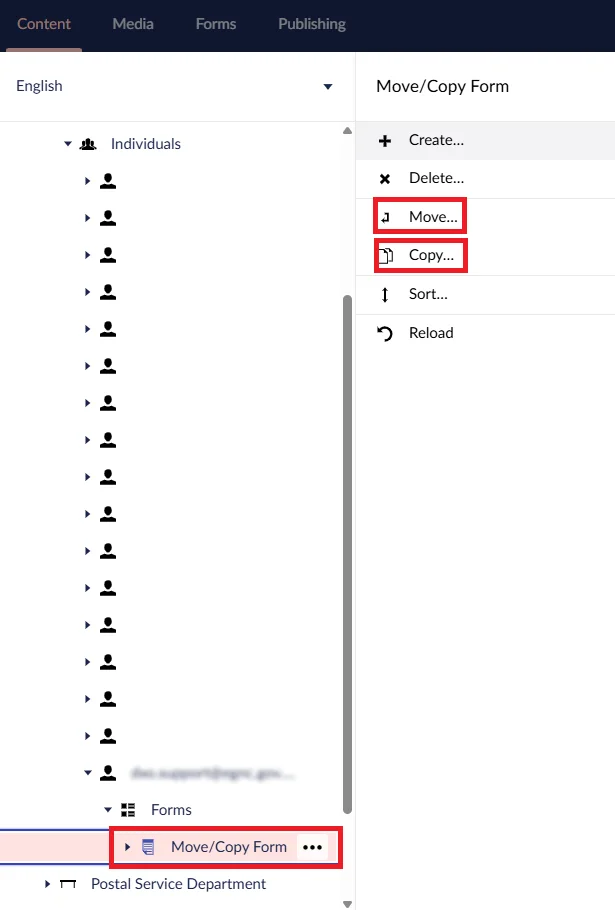
Select Target User and Workspace
After selecting the appropriate action (Copy or Move), the Tenant Admin must locate the Form Editor to whom the form will be copied or moved.
Once the user is found, expand the Form Editor’s workspace (Step 1) and select Forms (Step 2). This is the destination where the form will be copied or moved.


© Copyright 2026 E-Government National Centre, Government of Brunei Darussalam.